
Boost Engagement and Check for Understanding with Pear Deck
By Lourdes Velasco, Lyles Collegiate Intermediate
In today’s digital learning environment, interactive tools have become essential for keeping students engaged and giving teachers quick feedback. Pear Deck is one of those tools that transforms a regular Google Slides presentation into a two-way conversation. This post will explore what Pear Deck is, why it’s helpful for middle school classrooms, and how you can start using it right away.
What is Pear Deck?
Pear Deck is an awesome add-on for Google Slides that transforms your regular presentations into interactive learning experiences. It lets you embed questions, polls, and activities directly into your slides, making lessons more engaging for students.
Why Use It in Education?
Pear Deck supports teaching and learning by making lessons active. Instead of calling on one or two volunteers, you hear from every student at once.
🙋 Boosts Student Participation: Every student gets a voice, not just the ones who always raise their hands.
🤫 Encourages Quieter Students: Lowers the barrier to participation for shy students.
✅ Instant Checks for Understanding: See in real-time if students are grasping the concepts.
🤩 Makes Lessons Fun: Adds an element of play and excitement to learning.
📈 Data Driven Insights: Gain insights into student understanding that inform your teaching.
🤝 Creates Engaging Environment: More engaging environments lead to improved focus and learning outcomes.
Getting Started with Pear Deck
How to Install the Pear Deck Add-On


Start a Pear Deck Lesson


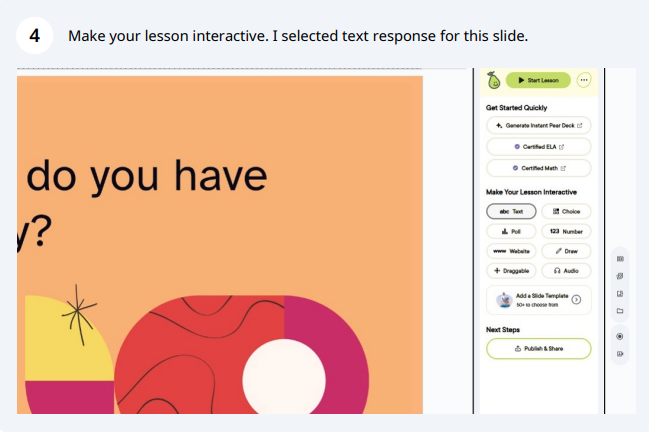


Best Practices & Tips
Start Small: Don't overload every slide with interactivity. Begin with 1-2 interactive slides per lesson.
Use Draggable Scale: It can be used to ask students how well they understand a topic, their confidence level, or even how they're feeling.
Exit Ticket: End your lesson with a quick exit ticket to gauge student understanding and collect valuable feedback.
Limit Interactive Slides: Balance passive and active learning. Don't make every slide interactive.
Resources
I plan to use Pear Deck in a digital citizenship lesson. I will use Pear Deck to show examples of online posts. Students will vote anonymously on whether each was safe to share, and the real-time results will spark a lively debate. Even my quietest students will join in!
Give it a try, and watch how it enhances learning in your classroom!
I used AI for brainstorming only and crafted the content myself.

